English
 Deutsch
 Espanol
 Français
 Portuguese
 中文
中文 한국어
한국어 日本語
日本語
Virtual Machine (VM)
What is a Virtual Machine (VM)?
A virtual machine (VM) is a software-based simulation of a physical computer that runs an operating system and applications just like a real machine. It is created and managed by a hypervisor, which allows multiple VMs to run on a single physical “host”. VMs running on the host are known as “guests”. Each VM operates independently, with its own virtual hardware components—such as CPU, memory, storage, and network interfaces—isolated from other VMs. This isolation enhances security and flexibility, as failures or changes in one VM do not affect others.
Virtual machines are widely used for testing software, running multiple operating systems, server consolidation, and cloud computing. They enable organizations to maximize hardware utilization, reduce costs, and simplify system management. Common hypervisors include VMware ESXi / vSphere, Microsoft Hyper-V, and Oracle VirtualBox. Overall, virtual machines provide an efficient and versatile way to use computing resources while maintaining strong separation between environments.
How do Virtual Machines Work?
A virtual machine (VM) works by using software to imitate the functions of a physical computer. This is done through a program called a hypervisor, which manages and allocates the physical hardware resources—like CPU, memory, storage, and network—to one or more virtual machines.
Here’s how it works step-by-step:
- Physical Hardware: The process starts with a physical computer or server, often called the host machine.
- Hypervisor Installation: A hypervisor (such as VMware ESXi, Microsoft Hyper-V, or Oracle VirtualBox) is installed on the host. It creates and manages virtual environments.
- Creating Virtual Machines: Each VM is a separate software-based computer that includes virtual hardware components—such as a virtual CPU, RAM, disk, and network adapter.
- Guest Operating System: A full operating system (like Windows, Linux, or macOS) is installed on each VM, known as the guest OS.
- Execution: When the VM runs, the hypervisor translates the VM’s virtual instructions into real hardware actions.
This setup allows multiple VMs to run independently on one physical machine, each with its own OS and applications, while sharing the same underlying hardware resources efficiently.
Nowadays it is increasingly common for organizations to run VMs upon cloud infrastructure bought from vendors such as Google, Amazon and Microsoft. In that scenario steps 1 and 2 are the responsibility of the vendor and the customer simply selects a VM instance type to deploy. The customer has no responsibility (and often no visibility into) for the physical hardware or hypervisor installation.
Types of Virtual Machine (VM)
There are two main types of virtual machines (VMs):
- System Virtual Machines
- Process Virtual Machines
System Virtual Machine
A system virtual machine provides a complete virtualized environment that mimics the entire physical computer system. It allows multiple operating systems (called guest OSs) to run on a single physical machine (called the host).
How it works:
Examples:
Use case:
System virtual machines are used for server virtualization, testing different operating systems, running multiple environments on one physical computer, or creating isolated environments for security.
Process Virtual Machine
A process virtual machine (PVM) is designed to run a single program or process and provides a platform-independent environment for it. It doesn’t emulate an entire hardware system; instead, it abstracts the underlying OS to allow the program to run anywhere.
How it works:
Examples:
Use case:
Process virtual machines are used to make applications portable across different systems and to manage execution environments for programming languages. Using a PVM means that you can run applications in specific languages on almost any host computer.
Use Cases of Virtual Machines (VMs)
Server Consolidation: Organizations can run multiple virtual servers on a single physical machine, reducing hardware costs, energy consumption, and maintenance needs.
Software Testing and Development: Developers use VMs to test applications in different operating systems or configurations without needing multiple physical computers. Each VM can be quickly reset to a clean state.
Running Multiple Operating Systems: VMs allow users to run applications requiring specific different OSs—such as Windows, Linux, or macOS—on the same device simultaneously. Specialist software is often certified against specific versions of an OS and VMs provide an easy way to ensure such applications are run on a supported OS version.
Disaster Recovery and Backup: Virtual machines can be easily cloned, backed up, or moved to another host, improving data protection and disaster recovery processes.
Legacy Application Support: Older software that only runs on outdated operating systems can be maintained within a virtual environment, extending its usability.
Cloud Computing: Cloud platforms such as AWS, Azure, and Google Cloud use VMs to deliver scalable, on-demand computing resources to users. Cloud VMs can be a cost effective way to leverage extra computational resources without investing in on-prem data centers and hardware.
Cybersecurity Training and Sandboxing: VMs are used to safely analyze malware, simulate cyberattacks, or test security tools without risking the host system. A caveat being that the most sophisticated malicious code is now designed to behave differently if it can detect it is running in a virtualized environment because of this use case.
What are the Benefits of Using a Virtual Machine (VM)?
Isolation and Security: Each virtual machine operates independently from others on the same physical host, which provides a strong layer of security. If one VM fails or becomes infected with malware, the others remain unaffected. This isolation allows users to test untrusted software or code safely without risking the main system or other virtual environments.
Efficient Resource Utilization: Virtual machines share the same hardware resources, such as CPU, memory, and storage, allowing for dynamic allocation based on workload needs. This maximizes the efficiency of physical hardware and reduces the need for multiple physical servers, lowering energy and maintenance costs.
Platform Independence and Flexibility: Virtualization enables multiple operating systems, such as Windows, Linux, and macOS, to run on a single physical computer. This flexibility helps developers, testers, and IT administrators easily switch between environments or test software across different platforms without requiring separate machines.
Backup, Recovery, and Migration: Virtual machines can be saved as snapshots and restored to previous states whenever needed. They can also be easily cloned or migrated to another host without reinstalling software. This simplifies system maintenance, upgrades, and disaster recovery, ensuring that data and services can be restored quickly.
Testing and Development: VMs are ideal for creating isolated environments for testing and development. Developers can experiment with new software, patches, or configurations without affecting production systems. This supports agile workflows, continuous integration, and automated testing environments.
Cost Savings: Using VMs reduces the need for multiple physical computers, saving on hardware, energy, and maintenance costs. Organizations can run several virtual servers on a single host, lowering infrastructure expenses while increasing overall efficiency. Many feel the cost benefits of virtualization are often oversold though, for some projects virtualization may not result in savings and add complexity.
Virtual Machines - Images
In the context of virtual machines, an image is a file that contains everything needed to start and run a virtual computer. It includes the operating system, software applications, system configurations, and any stored data. A virtual machine image acts like a template or snapshot of a system’s hard drive. When you create a new VM from an image, it is like copying a complete, ready-to-use computer.
Images are very useful because they save time and ensure consistency. Instead of setting up each virtual machine from scratch, you can use an existing image to quickly create identical systems. This is especially helpful for testing, development, or large-scale deployments in data centers or cloud environments.
A golden image is a special type of virtual machine image that serves as a master copy. It is a clean, fully configured, and optimized version of a system that meets all organizational standards. New VMs are cloned from this golden image to guarantee uniform performance, security, and configuration across all systems. Using golden images reduces errors, speeds up deployment, and simplifies maintenance.
Cloud Virtual Machines (VMs) – Instance Types
When organizations purchase / rent VMs on cloud infrastructure they are offered VMs of various set specifications with quantified amounts of CPU, RAM and other resources and CPU specifications. These “instance types” are essentially a definition similar to the concept of a golden image but also have pricing models attached.
Instance types are configured to be suitable for certain use cases and pricing models may vary. VMs designed for HPC or to run graphically intensive applications will usually have GPU resource included.
Most cloud providers offer VM instance types specifically designed for VDI and DaaS (Desktop-as-a-Service) use cases. Learn more about the types of decisions involved in selecting instance types, see: Choosing Azure Instances for Microsoft AVD.
How to Monitor VMs
Monitoring virtual machines is essential for maintaining performance, stability, and efficient resource usage. Effective VM monitoring should also include tracking end-user experience, response times, and system health. Monitoring tools should analyze CPU, memory, storage, and network utilization to prevent bottlenecks and optimize workloads.
There are two main approaches to VM monitoring: agent-based and agentless methods.
Agentless Monitoring: Agentless tools gather data directly from the hypervisor or cloud platform using APIs or remote access protocols. This approach is lighter on resources and easier to deploy, but it offers less granular data about application-level performance. This outside view of a virtual machine focuses on the resources of the physical machine and how these resources are used by the different VMs. Using the outside view, you can answer questions such as “Which VM is responsible for the resource utilization of a machine” and “is the physical machine adequately sized – does it have sufficient CPU or memory resources to handle its workload”.
Agent-Based Monitoring: In this approach, a small software agent is installed inside each virtual machine. The agent collects detailed data such as CPU, memory, disk I/O, application performance, and user experience metrics. Metrics collected are associated with specific applications, processes and users so give granular insights.
Agent-based monitoring provides deep visibility into the guest OS and running applications, making it ideal for troubleshooting and performance tuning. However, it can increase resource usage slightly on each VM. With the agentless outside view of a VM, an administrator can determine which VM is taking up excessive resources. However, the immediate next question is always “WHY is the VM taking up resources” – i.e., is it because of excessive load on the VM? is it because of a run-away process running inside the VM? To answer such questions, it is important to understand what is happening inside the VM. This is the “inside view of a VM” given by agented monitoring.
Agent-based monitoring has implications for management and security models. Deploying and updating the agent upon the VM may cause compliance overheads in certain regulated industries.
It is common for agented monitoring to be used for VDI and DaaS use cases of VMs because the priority is the health and performance of the application workloads and user experience. Metrics around remoting protocol (e.g., PCoIP, Citrix EDT/HDX, Microsoft RDP) performance of user sessions are very important in this scenario.
How AIOps Enhances Observability for Virtual Machines (VMs)
AIOps (Artificial Intelligence for IT Operations) uses machine learning and analytics to automate the detection, analysis, and resolution of IT issues. When applied to virtual machines, it strengthens observability by turning large volumes of operational data into meaningful, real-time insights. Some features of AIOps-enable monitoring solutions, include:
AIOps enhances VM observability by making monitoring proactive and data-driven. It automates analysis, predicts issues, reduces alert fatigue, and supports faster recovery—delivering smarter, more efficient management of virtualized systems. Learn more about AIOps monitoring solutions, see: What is AIOps? - IT Glossary | eG Innovations.
Right-sizing Virtual Machines (VMs)
Right-sizing a virtual machine is the process of adjusting a VM’s resources—such as CPU, memory, storage, and network capacity—to best match the actual performance needs of your workload. The goal is to optimize performance while minimizing cost by avoiding both over-provisioning (too many resources) and under-provisioning (too few resources).
Here’s how the process typically works:
- Monitor Performance: Collect data on CPU usage, memory utilization, disk I/O, and network activity over time using monitoring tools such as eG Enterprise.
- Analyze Workload Requirements: Identify which resources are consistently underused or overused. For example, if CPU usage rarely exceeds 20%, the VM may be oversized. Tools such as eG Enterprise will do this automatically for you.
- Select the Right Size: Based on the analysis, choose a VM size or instance type that aligns with the workload’s actual needs. Cloud providers like Azure offer many VM sizes optimized for compute, memory, or storage.
- Test and Validate: After resizing, monitor the VM again to ensure performance remains stable and costs are reduced.
Right-sizing is an ongoing process that helps organizations achieve cost efficiency, better resource utilization, and improved performance in cloud or virtualized environments.
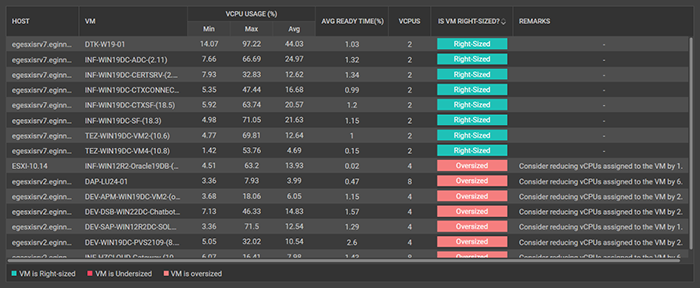
eG Enterprise will identify VMs where VMs are not right-sized and make recommendations
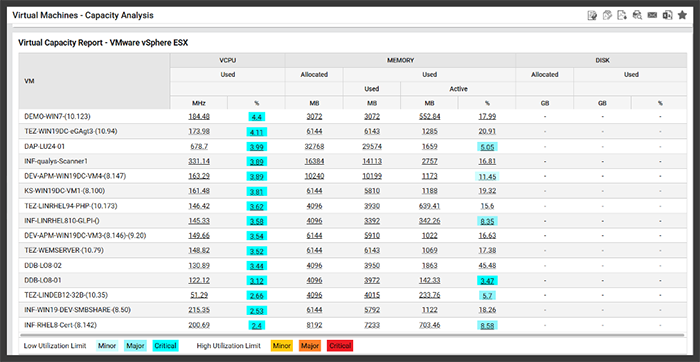
Capacity analysis of VMs will help you evaluate right-sizing and map on-prem VMs to cloud instance alternatives
Advanced monitoring solutions such as eG Enterprise are built with domain-specific intelligence and understanding of cloud vendors’ VM instance types and capacities. This allows a platform such as eG Enterprise to automatically analyze your real-world cloud usage and provide out-of-the-box reports identifying under and overprovisioned instances and right-sizing recommendations. Right-sizing capabilities are essential for control costs for cloud VMs.

eG Enterprise automatically alerts cloud administrators to VM resizing recommendations
Virtual Machines vs Containers
A virtual machine (VM) and a container are both technologies used to run applications in isolated environments, but they differ in how they operate and manage resources.

A virtual machine emulates an entire computer system, including virtual hardware and its own operating system. It runs on a hypervisor that manages multiple VMs on a single physical host. Each VM is completely independent, which provides strong security and isolation. However, this makes VMs heavier, slower to start, and more resource-intensive because every VM includes a full operating system.
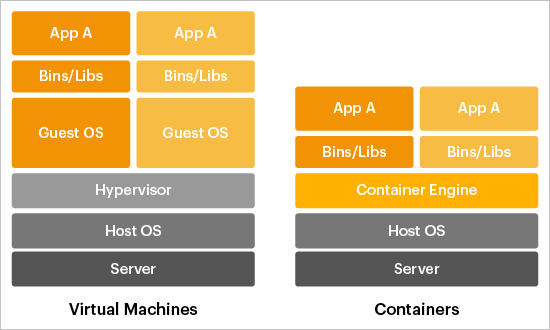
Comparing Virtual Machines and Containers
A container, on the other hand, shares the host operating system’s kernel and isolates applications at the process level. Containers package the application and its dependencies, allowing them to run consistently across different environments. They are lightweight, start almost instantly (in comparison a VM may take a few if not several minutes to start), and use fewer resources than VMs.
In terms of use cases, virtual machines are ideal for running different operating systems on the same hardware or for applications that need strong isolation. Containers are better suited for modern software development, microservices, and cloud applications where efficiency, scalability, and fast deployment are essential.
Broadly, VMs provide complete isolation and flexibility, while containers offer speed, portability, and efficiency. To learn more about Containers vs. VMs, see: Containers vs VM & Virtual Machines | eG Innovations.
For a deeper understanding of containers, please see: Containers - IT Glossary | eG Innovations.